nextAuth is part of itsme, the trusted European identity platform. learn more

nextAuth is part of itsme, the trusted European identity platform. learn more
Combining ESP32, Arduino, nextAuth APIs, HTTPS GET & POST, NTP, mail
By: Frank Staut, chairman of the board at nextAuth.
I started this project during the lockdown of Covid-19. I had some spare time since many of my appointments were either cancelled or replaced with online meetings. I found this project to be interesting to learn about both the nextAuth solution and Arduino in general.
As an electronics engineer, I have always been interested in the evolution of microprocessors and what we can do with these. My thesis in college was around an 8052AH Basic microprocessor in 1992. During this project I used an ESP32 processor with onboard WiFi and Bluetooth, a huge step in both performance and possibilities.
I am the chairman of the board at nextAuth. After a career in IT Security, I was the co-founder of the company SecureLink, I started an investment company with my co-founders and we, amongst others, invest in nextAuth. This project obliged me to study the nextAuth solution in more detail.
My goal is to provide you with a technical overview of all the different steps I have taken. I found a lot of useful information on the internet and this is my way to give this consolidated info back to the community.
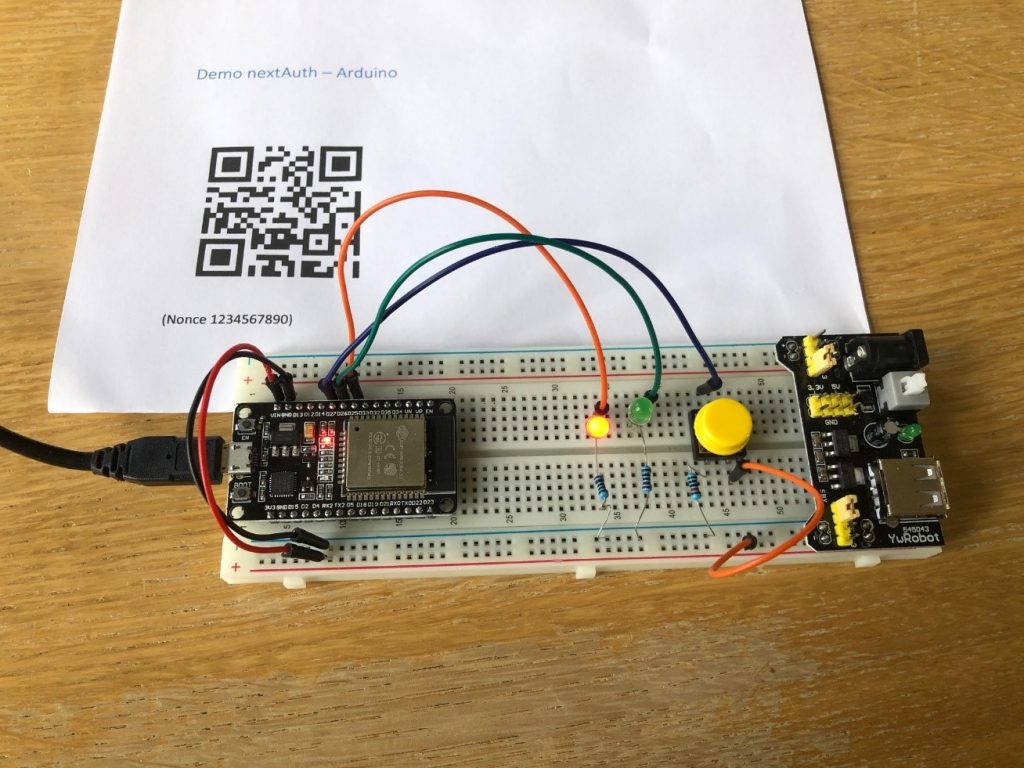
I developed a Proof-of-Concept whereby the nextAuth mobile user authentication is used to open a lock. The lock is opened (i.e. the green led lights up) by pushing a button, if at that point a user is logged in. Before logging in, you need the nextAuth app (Android, iOS) and register it with the server. To log in, you scan a QR code with the app, and input your PIN or biometric (fingerprint or FaceID).
In this project, I only use a small subset of the capabilities of nextAuth. Next to user authentication, they have also electronic signing and secure communication options. The big advantage of nextAuth is that it is a fully API based solution which integrates easily in existing solutions.
Nevertheless, this project shows the ability to integrate the nexAuth solution in IoT projects.
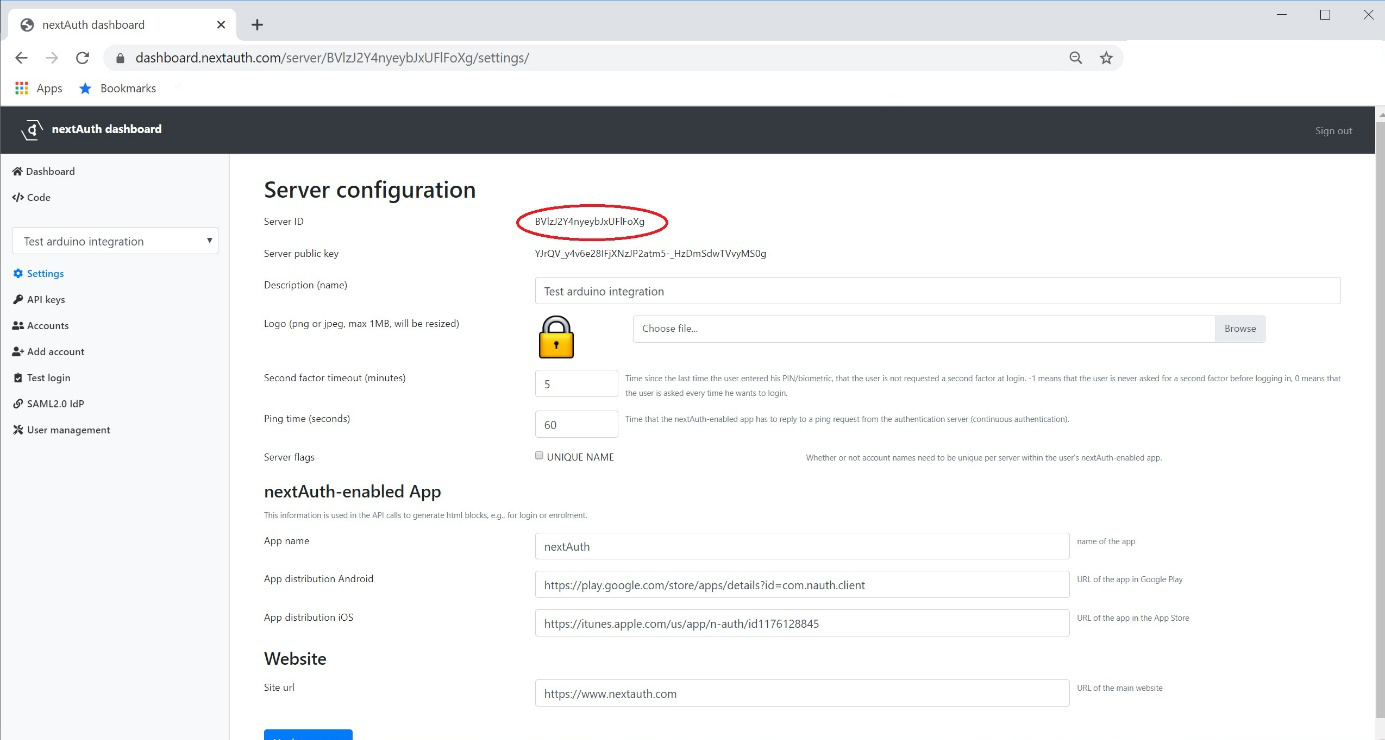
Go to https://dashboard.nextauth.com/ to create your developer account. You will receive an email with a magic link to login with.
Once you have access to the dashboard you can create your own server to do further testing. In this server you also find the necessary ServerID and APIkeys.
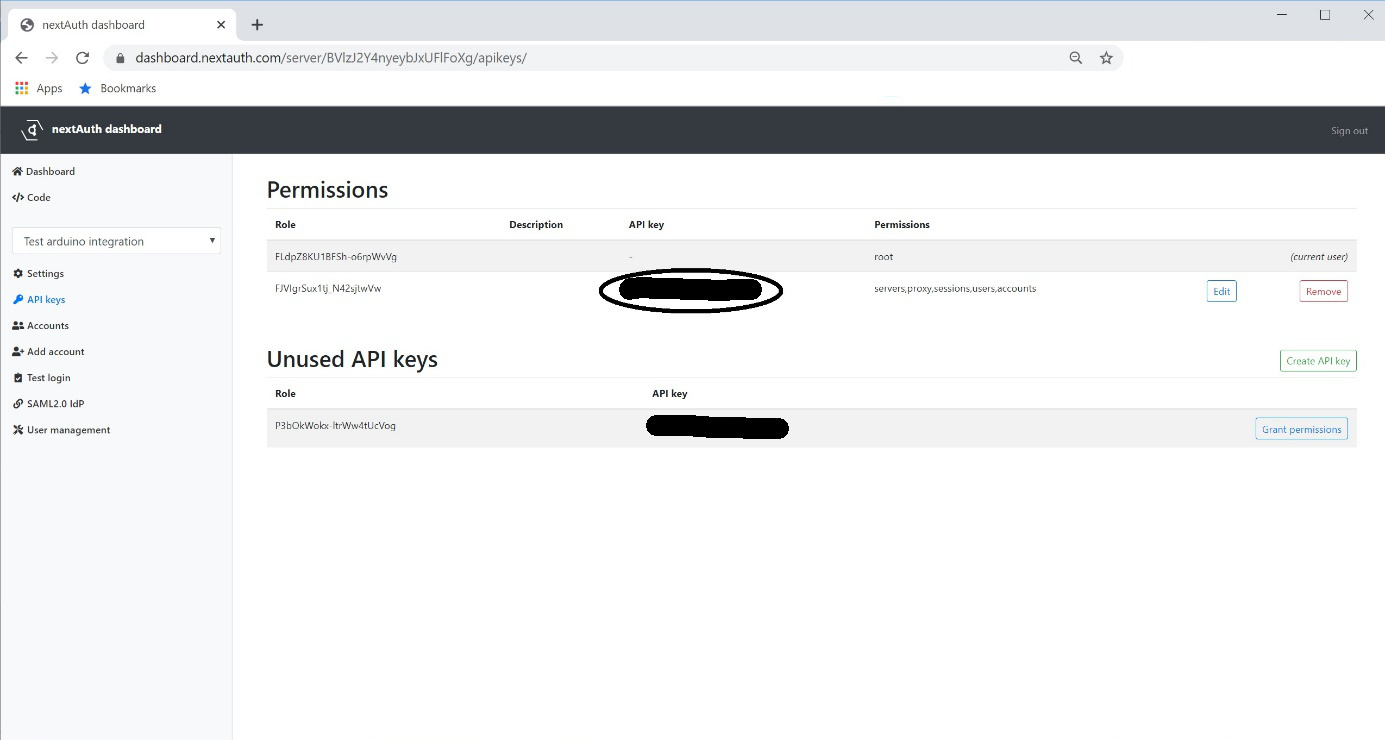
The full API specification is available at https://api.docs.nextauth.com/.
For this project we only make use of 3 API calls (assuming you created an account in the dashboard):
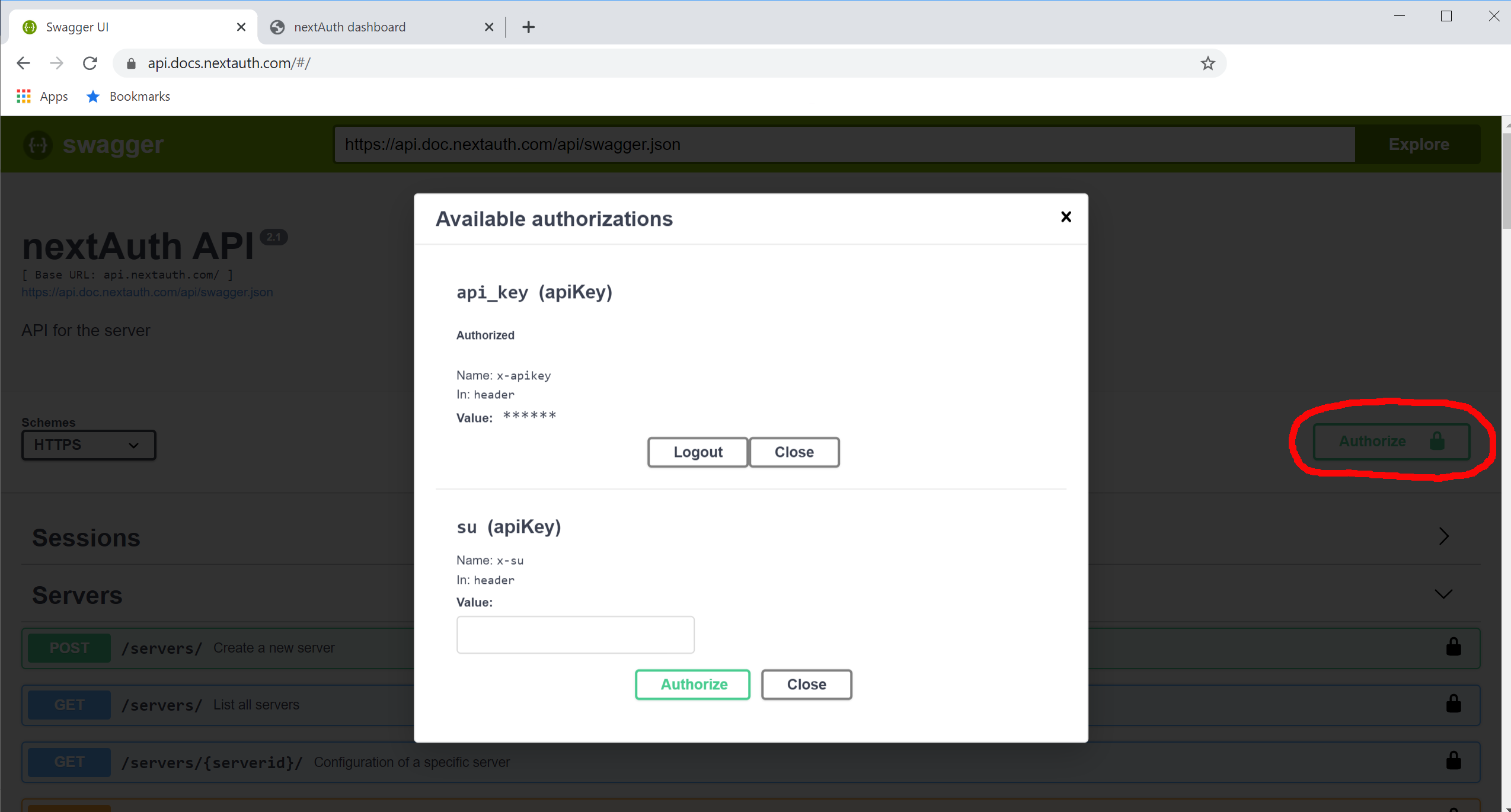
You can play around with the API directly from the swagger interface by clicking on try it out below every API call. After filling in the required fields (X-nonce can be any string), hit execute. This will produce a curl command that you can use directly in any command line tool and the output from the nextauth server.
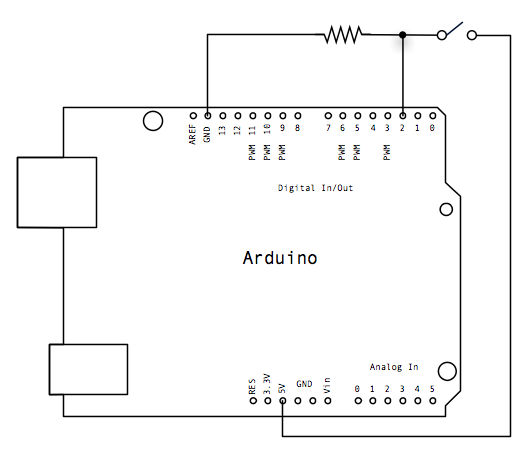
For this project I used a NODEMCU ESP32 microcontroller development board. I only used 3 pins, 2 for connecting a LED and one for connecting a button.
I used the Arduino IDE (version 1.8.12) for this project. First, I needed to add the additional boards manager URL in preferences in order to use the ESP32 board. After that, I needed to install the ‘ESP32 by Espressif Systems’ in boards manager. After that, I could choose my board and start playing around.
(These steps depend on which board you actually use, see the documentation for your board.)
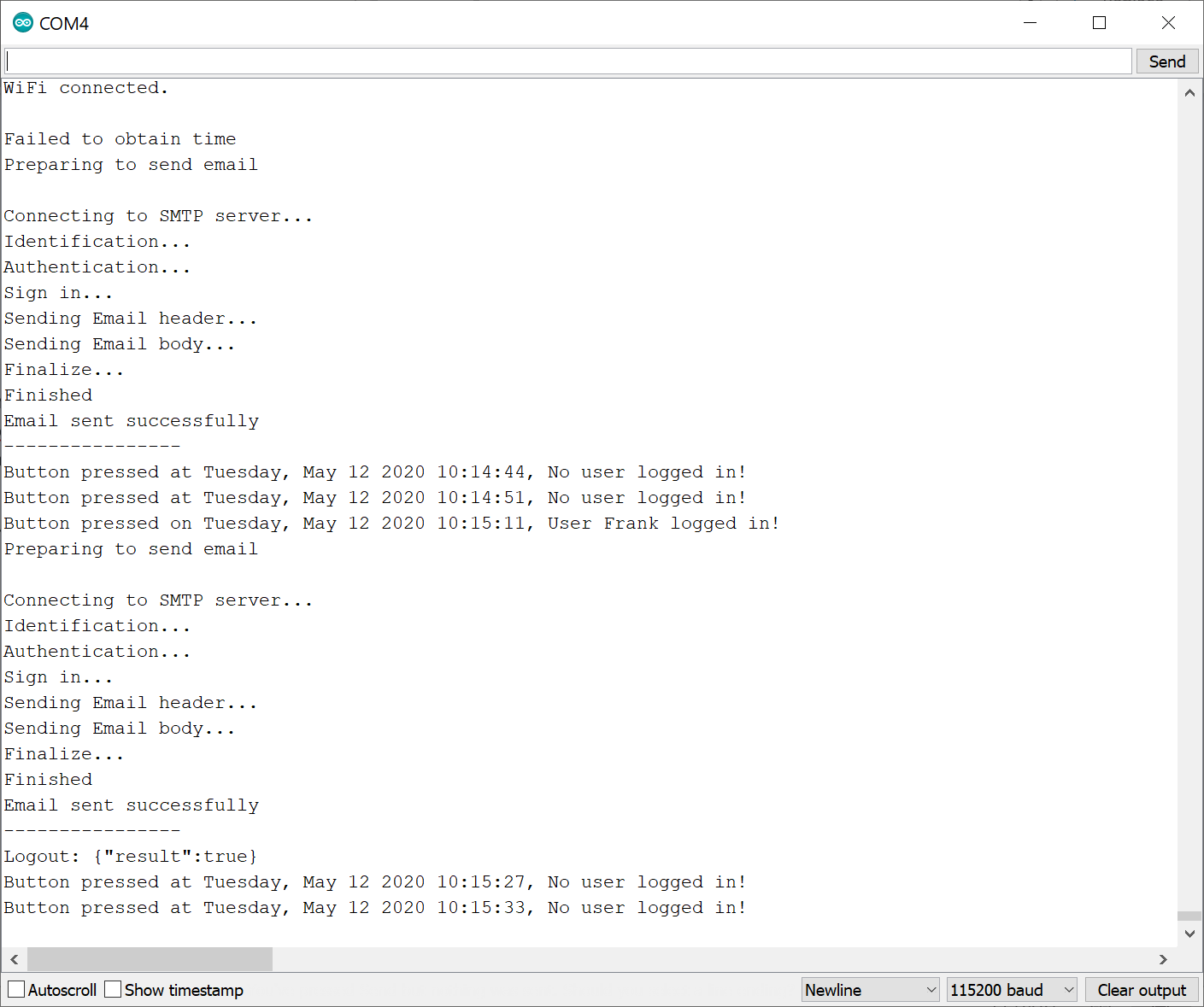
I have added NTP and mail for convenient logging. I also use the serial port to see what is going on.
Schematically it comes down to this:
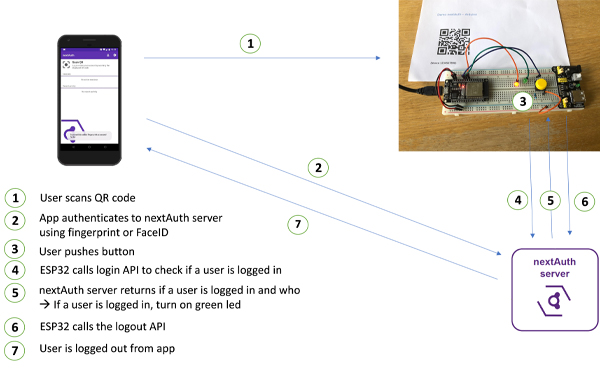
I start with connecting to WiFi and to start an NTP client to synchronize the internal clock of the ESP32. I also send an e-mail that the system has booted.
Then a loop is started to see if someone has pressed the button. If the button is pressed then the APIlogincheck() function is called. This function returns the output from the server, which is in json format.
After decoding the returned json, I check the loggedin variable which is a boolean. If true, the led switches to green and an e-mail is send including the username and time. Afterwards the APIlogout() function is started which forces a logout on the server.
I have used the WiFiClientSecure.h class for sending HTTPS GET and POST commands. In order for this to work, you need to provide the correct certificate (the root certificate of https://api.nextauth.com — currently DST Root CA X3).
This project shows that the nextAuth solution can be used for other than purely IT related applications. Also in the physical world we can benefit from the high security nextAuth brings.
This project gives food for thought on what we could do more with the nextAuth solution. One of the things that I will do, if I have time, is to configure websockets, so that I can avoid using a physical button. Then, instead of scanning a QR code, the physical button could be used for pushing a authentication request to the last user that got in, or to (a set of) predefined accounts. The app could be adapted to communicate over BLE with the locker, which then acts as a proxy for all communication with the nextAuth server. As such, it will also work in situations where there is no internet access for the mobile device.
					#include "ESP32_MailClient.h"
#include "time.h"
#include <WiFiClientSecure.h>
#include <ArduinoJson.h>

// REPLACE WITH YOUR NETWORK CREDENTIALS
const char *ssid = "<SSID>";
const char *password = "<PASSWORD>";

const char *ntpServer = "pool.ntp.org";
const long gmtOffset_sec = 3600;
const int daylightOffset_sec = 3600;

const char *server = "api.nextauth.com"; // Server URL

const String serverid = "<YOUR SERVER ID>";
const String apikey = "<YOUR API KEY>";
const String nonce1 = "1234567890";

const char *root_ca =
    "-----BEGIN CERTIFICATE-----\n"
    "MIIDSjCCAjKgAwIBAgIQRK+wgNajJ7qJMDmGLvhAazANBgkqhkiG9w0BAQUFADA/\n"
    "MSQwIgYDVQQKExtEaWdpdGFsIFNpZ25hdHVyZSBUcnVzdCBDby4xFzAVBgNVBAMT\n"
    "DkRTVCBSb290IENBIFgzMB4XDTAwMDkzMDIxMTIxOVoXDTIxMDkzMDE0MDExNVow\n"
    "PzEkMCIGA1UEChMbRGlnaXRhbCBTaWduYXR1cmUgVHJ1c3QgQ28uMRcwFQYDVQQD\n"
    "Ew5EU1QgUm9vdCBDQSBYMzCCASIwDQYJKoZIhvcNAQEBBQADggEPADCCAQoCggEB\n"
    "AN+v6ZdQCINXtMxiZfaQguzH0yxrMMpb7NnDfcdAwRgUi+DoM3ZJKuM/IUmTrE4O\n"
    "rz5Iy2Xu/NMhD2XSKtkyj4zl93ewEnu1lcCJo6m67XMuegwGMoOifooUMM0RoOEq\n"
    "OLl5CjH9UL2AZd+3UWODyOKIYepLYYHsUmu5ouJLGiifSKOeDNoJjj4XLh7dIN9b\n"
    "xiqKqy69cK3FCxolkHRyxXtqqzTWMIn/5WgTe1QLyNau7Fqckh49ZLOMxt+/yUFw\n"
    "7BZy1SbsOFU5Q9D8/RhcQPGX69Wam40dutolucbY38EVAjqr2m7xPi71XAicPNaD\n"
    "aeQQmxkqtilX4+U9m5/wAl0CAwEAAaNCMEAwDwYDVR0TAQH/BAUwAwEB/zAOBgNV\n"
    "HQ8BAf8EBAMCAQYwHQYDVR0OBBYEFMSnsaR7LHH62+FLkHX/xBVghYkQMA0GCSqG\n"
    "SIb3DQEBBQUAA4IBAQCjGiybFwBcqR7uKGY3Or+Dxz9LwwmglSBd49lZRNI+DT69\n"
    "ikugdB/OEIKcdBodfpga3csTS7MgROSR6cz8faXbauX+5v3gTt23ADq1cEmv8uXr\n"
    "AvHRAosZy5Q6XkjEGB5YGV8eAlrwDPGxrancWYaLbumR9YbK+rlmM6pZW87ipxZz\n"
    "R8srzJmwN0jP41ZL9c8PDHIyh8bwRLtTcm1D9SZImlJnt1ir/md2cXjbDaJWFBM5\n"
    "JDGFoqgCWjBH4d1QB7wCCZAA62RjYJsWvIjJEubSfZGL+T0yjWW06XyxV3bqxbYo\n"
    "Ob8VZRzI9neWagqNdwvYkQsEjgfbKbYK7p2CNTUQ\n"
    "-----END CERTIFICATE-----\n";

WiFiClientSecure client;

const int redled = 25;
const int greenled = 26;
const int buttonPin = 27;

int buttonState = 0;

#define emailSenderAccount "<E-MAIL sender>"
#define emailSenderPassword "<PASSWORD>"
#define emailRecipient "<E-MAIL recipient>"
#define smtpServer "smtp.office365.com"
#define smtpServerPort 587
#define emailSubject "ESP32 Proof-of-Concept nextAuth"

// The Email Sending data object contains config and data to send
SMTPData smtpData;

// Callback function to get the Email sending status
void sendCallback(SendStatus info);

void setup()
{
  pinMode(redled, OUTPUT);
  pinMode(greenled, OUTPUT);
  pinMode(buttonPin, INPUT);

  Serial.begin(115200);
  Serial.println();
  Serial.print("Connecting");

  WiFi.begin(ssid, password);
  while (WiFi.status() != WL_CONNECTED)
  {
    Serial.print(".");
    delay(200);
  }

  Serial.println();
  Serial.println("WiFi connected.");
  Serial.println();

  client.setCACert(root_ca);

  configTime(gmtOffset_sec, daylightOffset_sec, ntpServer);
  printLocalTime();

  String datetime = gettimedatevariable();

  String LocalIP = String() + WiFi.localIP()[0] + "." + WiFi.localIP()[1] + "." + WiFi.localIP()[2] + "." + WiFi.localIP()[3];

  String mailbody = "<div style=\"color:#2f4468;\"><h1>ESP32 booted on : ";
  mailbody += datetime;
  mailbody += " </h1>";
  mailbody += "<p>IP address = ";
  mailbody += LocalIP;
  mailbody += "<p>- Sent from ESP32 board</p></div>";

  sendmail(mailbody);
}

void loop()
{
  String datetime = gettimedatevariable();

  digitalWrite(redled, HIGH);
  digitalWrite(greenled, LOW);
  buttonState = digitalRead(buttonPin);

  if (buttonState == HIGH)
  {
    String APIresult = APIlogincheck();
    // Serial.println(APIresult);

    StaticJsonDocument<1000> doc;
    char json[1000];
    APIresult.toCharArray(json, 1000);
    DeserializationError error = deserializeJson(doc, json);
    if (error)
    {
      Serial.print(F("deserializeJson() failed: "));
      Serial.println(error.c_str());
      return;
    }

    bool loggedin = doc["loggedin"];
    if (loggedin)
    {
      int accountid = doc["accountid"];
      const char *hsid = doc["hsid"];
      const char *loginqrdata = doc["loginqrdata"];
      const char *pk = doc["pk"];
      bool canprovoke = doc["canprovoke"];
      const char *provokeaccounts = doc["provokeaccounts"]; //
      const char *userid = doc["userid"];
      long version = doc["version"];

      // Print values.
      Serial.print("Button pressed on ");
      Serial.print(datetime);
      Serial.print(", User ");
      Serial.print(userid);
      Serial.println(" logged in!");

      digitalWrite(greenled, HIGH);
      digitalWrite(redled, LOW);

      String mailbody = "<div style=\"color:#2f4468;\"><h1>Button pressed on ESP32, user ";
      mailbody += userid;
      mailbody += " logged in on ";
      mailbody += datetime;
      mailbody += ".</h1>";
      mailbody += "<p>- Sent from ESP32 board</p></div>";
      sendmail(mailbody);

      String APIresult = APIlogout();
      Serial.print("Logout: ");
      Serial.println(APIresult);
    }
    else
    {
      Serial.print("Button pressed at ");
      Serial.print(datetime);
      Serial.println(", No user logged in!");
      delay(2000);
    }
  } // end if button state HIGH
}

void sendmail(String htmlbody)
{
  Serial.println("Preparing to send email");
  Serial.println();

  // Set the SMTP Server Email host, port, account and password
  smtpData.setLogin(smtpServer, smtpServerPort, emailSenderAccount, emailSenderPassword);

  // For library version 1.2.0 and later which STARTTLS protocol was supported,the STARTTLS will be
  // enabled automatically when port 587 was used, or enable it manually using setSTARTTLS function.
  //smtpData.setSTARTTLS(true);

  // Set the sender name and Email
  smtpData.setSender("ESP32", emailSenderAccount);

  // Set Email priorty or importance High, Normal, Low or 1 to 5 (1 is highest)
  smtpData.setPriority("High");

  // Set the subject
  smtpData.setSubject(emailSubject);

  // Set the message with HTML format
  smtpData.setMessage(htmlbody, true);
  // Set the email message in text format (raw)
  //smtpData.setMessage("Hello World! - Sent from ESP32 board", false);

  // Add recipients, you can add more than one recipient
  smtpData.addRecipient(emailRecipient);
  //smtpData.addRecipient("YOUR_OTHER_RECIPIENT_EMAIL_ADDRESS@EXAMPLE.com");

  smtpData.setSendCallback(sendCallback);

  //Start sending Email, can be set callback function to track the status
  if (!MailClient.sendMail(smtpData))
    Serial.println("Error sending Email, " + MailClient.smtpErrorReason());

  //Clear all data from Email object to free memory
  smtpData.empty();
}

// Callback function to get the Email sending status
void sendCallback(SendStatus msg)
{
  // Print the current status
  Serial.println(msg.info());

  // Do something when complete
  if (msg.success())
  {
    Serial.println("----------------");
  }
}

void printLocalTime()
{
  struct tm timeinfo;
  if (!getLocalTime(&timeinfo))
  {
    Serial.println("Failed to obtain time");
    return;
  }
  Serial.println(&timeinfo, "%A, %B %d %Y %H:%M:%S");
}

String gettimedatevariable()
{
  time_t rawtime;
  struct tm timeinfo;
  if (!getLocalTime(&timeinfo))
  {
    Serial.println("Failed to obtain time");
    String error;
    error = "Failed to obtain time";
    return error;
  }

  char timeStringBuff[50]; //50 chars should be enough
  strftime(timeStringBuff, sizeof(timeStringBuff), "%A, %B %d %Y %H:%M:%S", &timeinfo);
  // print like "const char*"
  //Serial.println(timeStringBuff);

  // Optional: Construct String object
  String asString(timeStringBuff);
  return timeStringBuff;
}

String APIlogincheck()
{
  if (!client.connect(server, 443))
  {
    return "Connection failed!";
  }
  else
  {
    String url = "GET https://" + String(server) + "/servers/" + serverid + "/sessions/ HTTP/1.0";
    client.println(url);
    String host = "Host: " + String(server);
    client.println(host);
    client.println("accept: application/json");
    String nonce = "X-nonce: " + nonce1;
    client.println(nonce);
    String APIkey = "x-apikey: " + apikey;
    client.println(APIkey);
    client.println("Connection: close");
    client.println();

    while (client.connected())
    {
      String line = client.readStringUntil('\n');
      if (line == "\r")
      {
        // Serial.println("headers received");
        break;
      }
    }
    String response = client.readString();
    return response;
  }
  client.stop();
}

String APIlogout()
{
  if (!client.connect(server, 443))
  {
    return "Connection failed!";
  }
  else
  {
    String url = "POST https://" + String(server) + "/servers/" + serverid + "/sessions/logout/ HTTP/1.0";
    client.println(url);
    String host = "Host: " + String(server);
    client.println(host);
    client.println("accept: application/json");
    String nonce = "X-nonce: " + nonce1;
    client.println(nonce);
    String APIkey = "x-apikey: " + apikey;
    client.println(APIkey);
    client.println("Connection: close");
    client.println();

    while (client.connected())
    {
      String line = client.readStringUntil('\n');
      if (line == "\r")
      {
        //Serial.println("headers received");
        break;
      }
    }

    String response = client.readString();
    return response;
  }
  client.stop();
}